
id or slug.If you just upgraded a Next.js project and your dynamic route page started throwing errors about params, welcome to the club. Somewhere between one version and the next, the Next.js team quietly decided that params — the innocent little object that hands you your dynamic route segments like id or slug — is no longer a plain object. It is now a Promise. Yes, a Promise. The same thing you get back from fetch(), except this time it’s just holding a string.
This one change trips up a shocking number of developers, mostly because the error message Next.js gives you is about as helpful as a fortune cookie. So let’s break down exactly what’s happening, why it’s happening, and how to fix your code without losing your mind (or your afternoon).
The Short Answer, For Skimmers
In modern Next.js (the App Router, versions 15 and up), route parameters like params and searchParams are asynchronous. That means you can’t just grab params.id directly anymore. You have to await it first. And in JavaScript and TypeScript, you can only use the await keyword inside a function that is marked async. Skip the async keyword, and your code won’t even compile. That’s the whole story in two sentences. Everyone else, keep reading.
Wait, Params Used to Be Simple. What Happened?
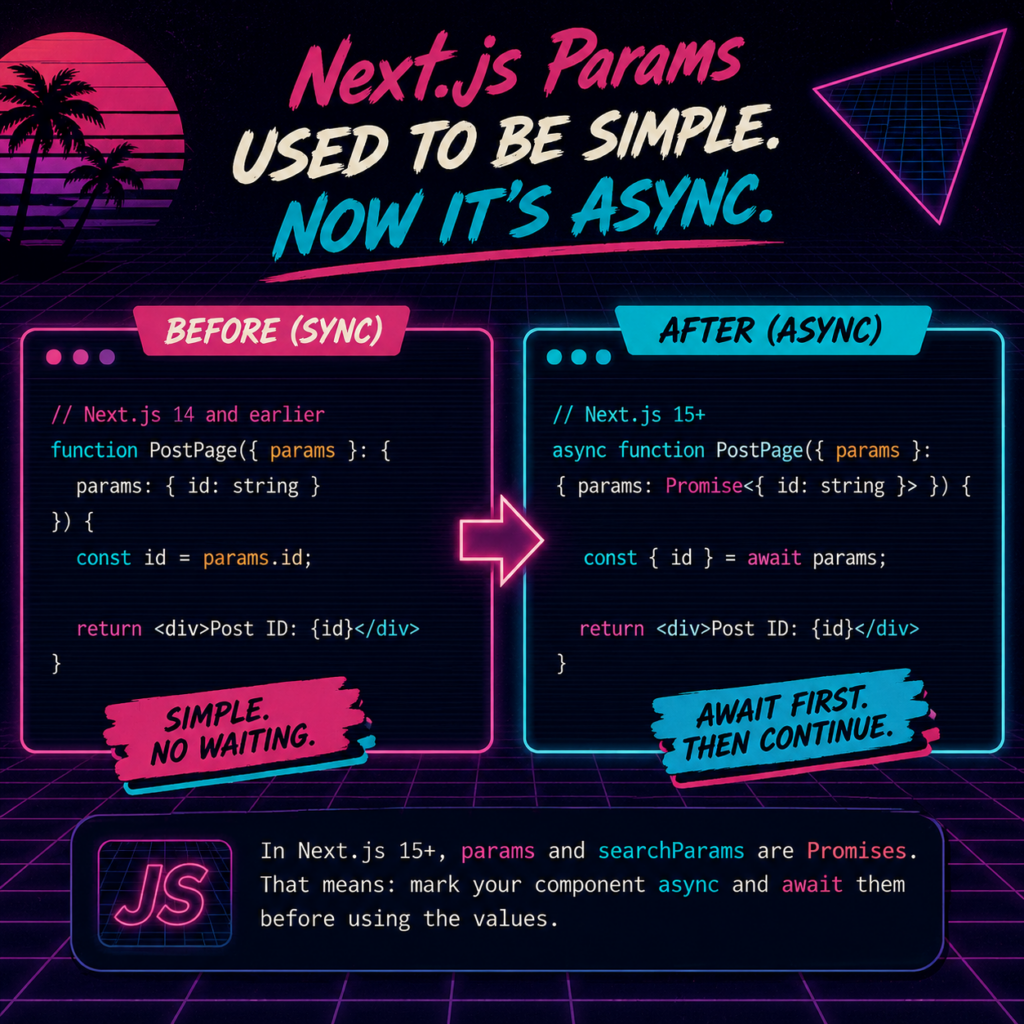
params to a Promise, so Server Components now need to await route parameters before using them.For a long time, if you built a dynamic page like app/posts/[id]/page.tsx, Next.js handed you a plain, synchronous object:
function PostPage({ params }: { params: { id: string } }) {
  const id = params.id; // simple, no waiting required
}
No waiting, no async, no ceremony. You grabbed the value and moved on with your life. Then the Next.js team started rolling out architectural changes to make rendering faster and more flexible, things like streaming and Partial Prerendering. To support that, several APIs that used to be synchronous, including params, searchParams, cookies(), and headers(), were converted into Promises.
The reasoning is that when parts of a page can be rendered progressively and pieces of data can arrive at different times, it makes more architectural sense to treat “give me the route parameters” as an asynchronous operation, even if in practice it often resolves almost instantly. Think of it less like Next.js needed extra time to fetch your id, and more like it needed the flexibility to treat everything the same way under the hood, so the whole rendering pipeline can be smarter about what loads when.
In plain English: the framework grew up, got more sophisticated internals, and params got swept along for the ride.
Async Functions and “await”: The Rule You Can’t Skip
Here’s the JavaScript fundamental hiding underneath all of this. The await keyword pauses execution until a Promise resolves, but it can only be used inside a function declared with the async keyword. This isn’t a Next.js rule, it’s a plain JavaScript rule that’s been true since async/await was introduced to the language.
So if you write this:
function PostPage({ params }: PostPageProps) {
  const { id } = await params; // ❌ SyntaxError
}
JavaScript looks at that await and has absolutely no idea what to do with it, because the function around it was never marked as asynchronous. It’s a bit like trying to tip a waiter before you’ve ordered any food. The context just isn’t there yet. Add async to the function, and suddenly the rules make sense:
async function PostPage({ params }: PostPageProps) {
  const { id } = await params; // ✅ works
}
That’s the entire “async is needed when await is used” rule. Once you say a function is async, JavaScript automatically wraps its return value in a Promise and allows you to pause execution inside it with await. No async, no await. They’re a package deal, like peanut butter and jelly, or bugs and Friday afternoon deploys.
Breaking Down Your Code, Line by Line
Let’s look at the actual example you’re working with, for a page located at app/posts/[id]/page.tsx:
type PostPageProps = {
  params: Promise<{ id: string }>;
}

export default async function PostPage({ params }: PostPageProps) {
  const { id } = await params;

  const response = await fetch(`https://jsonplaceholder.typicode.com/posts/${id}`);
  const post = await response.json();
Here’s what each piece is doing:
- The type definition tells TypeScript that
paramsisn’t just{ id: string }anymore, it’s a Promise that will eventually resolve to that shape. This is what makes TypeScript yell at you if you forget theawait. - The
asynckeyword on the function is what makes the whole thing legal. SincePostPageis a Server Component being rendered by Next.js itself, marking itasyncis completely safe and expected. const { id } = await params;unwraps the Promise and destructures theidfield out of it in one line. This is the step people forget when copying old tutorials.- The
fetchandresponse.json()calls are unrelated to the params change, they’re just standard asynchronous operations that also needawait, for the exact same reason described above.
Quick way to remember it: if you see the word Promise anywhere in a type definition, you need await to get the real value out. And any function using await must be declared async.
The searchParams Sibling
If params got this treatment, you’d better believe its cousin searchParams did too. Query string values like ?sort=newest now also arrive as a Promise:
type PageProps = {
  searchParams: Promise<{ sort?: string }>;
}

export default async function Page({ searchParams }: PageProps) {
  const { sort } = await searchParams;
}
Same rule, same fix, same everything. Once you’ve internalized the pattern for params, searchParams is just a copy-paste away.
Common Errors You’ll Run Into
Here are the greatest hits you’ll likely see while migrating:
- “await is only valid in async functions” — you used
awaitbut forgot to addasyncto the function declaration. This is the exact scenario in your code sample. - “Property ‘id’ does not exist on type ‘Promise'” — you tried to access
params.iddirectly without awaiting it first. TypeScript is politely reminding you that a Promise doesn’t have anidproperty, only the resolved value does. - Silent bugs where
idisundefined— this happens if you awaited the wrong thing or destructured before the Promise resolved. Double-check thatawaitis sitting directly on the Promise itself.
How to Migrate Older Next.js Code
If you’ve got an existing project full of pages written the old, synchronous way, you have two options:
- Run the official codemod. Next.js ships an automated migration tool that rewrites your
paramsandsearchParamsusage for you. It’s not flawless, but it saves a lot of manual grinding through every route file. - Do it manually, following the exact three-step pattern from this article: mark the component
async, typeparamsas a Promise, andawaitit before use. For a small to mid-size app, this is often faster than debugging what the codemod changed.
Quick Reference Cheat Sheet
// Type it as a Promise
type PageProps = {
  params: Promise<{ id: string }>;
};

// Mark the component async
export default async function Page({ params }: PageProps) {
  // Await it before use
  const { id } = await params;

  return <div>Post ID: {id}</div>;
}
Frequently Asked Questions
Do I need to await params in every dynamic route?
Yes, if you’re on a Next.js version where params was changed to a Promise (App Router, v15+). This applies to every dynamic segment, whether it’s [id], [slug], or a catch-all route.
Does this slow my page down?
No. Awaiting the params Promise typically resolves almost instantly, since the values are already known by the time your component runs. This is an architectural change, not a performance tax.
Can I use async/await in a Client Component the same way?
No. Client Components (marked with "use client") can’t be async functions the way Server Components can. If you need params in a Client Component, unwrap them in a parent Server Component and pass the resolved values down as props, or use React’s use() hook.
What happens if I just don’t await params at all?
TypeScript will complain immediately if you’re using proper types, since you’d be trying to read properties off a Promise object instead of the resolved value. At runtime, you’d get undefined instead of your actual data.
Wrapping Up
None of this means Next.js is trying to make your life harder for sport. The move to async params is part of a bigger shift toward more flexible, streaming-friendly rendering. Once you’ve internalized the pattern, “mark it async, type it as a Promise, await it before use,” it becomes muscle memory, and you’ll barely remember a time when params.id just worked without any of this ceremony.
So the next time your build throws a fit about a missing async keyword, you’ll know exactly what’s going on, and exactly how to fix it in about ten seconds flat.

Related Posts
 SEO vs. AEO vs. GEO: What’s the Difference (And Why Your Marketing Team Now Needs a Glossary)
 Setting Up a New Laravel App: A Real Walkthrough (Including the Part That Broke)
 MySQL Workbench Alternatives: The Best Database Tools for Local, Dev, and Production
 Getting Started with Vue 3: From npm create vue to Understanding script setup